Neutral Wedding Invite Mockup 5x7: A Design Essential
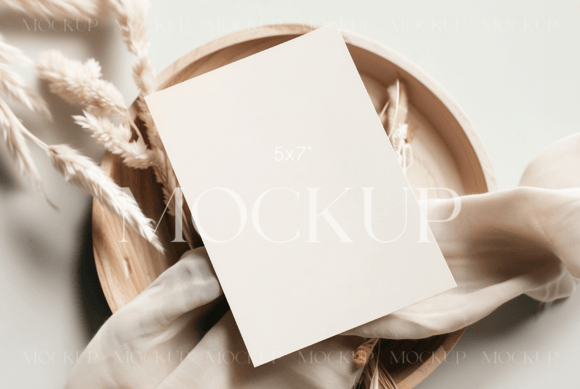
There's a particular kind of stress that comes with finalizing a wedding invitation design. You've poured hours into selecting the perfect script font, adjusting kerning, and finding a layout that feels both personal and elegant. But when you present that design to a client—or even just visualize it for yourself—it's still a flat digital file. The texture of the paper, the way light plays on the surface, the tangible feel of a real card... that's all missing. This is the gap our Neutral Wedding Invite Mockup 5x7 was built to fill.
This isn't just another template. It's a carefully crafted stage for your work. The "neutral" aspect is its superpower. We're not talking about a boring beige, but a sophisticated, warm off-white with subtle, natural undertones. It acts like a perfect gallery wall, allowing the true character of your typeface and design choices to shine without competition. Whether your invitation features a bold, modern display font or a delicate, flowing handwritten font, this mockup provides the quiet confidence your design deserves.
More Than a Pretty Picture: The Practical Power of a PSD Mockup
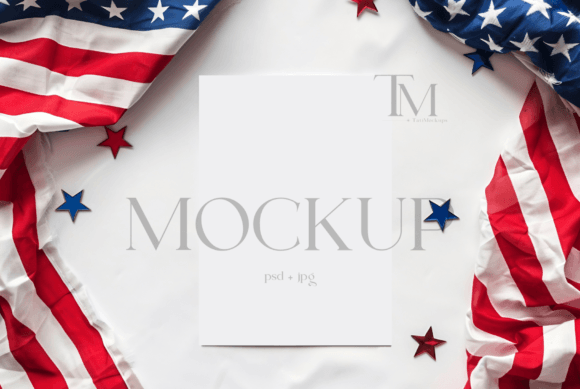
At its core, this is a 5x7" Card Mockup using Smart Object in Photoshop. That technical detail is where the real utility lies. For the uninitiated, a Smart Object is a special layer in Photoshop that preserves the original data of your design. You simply double-click the designated layer, paste your invitation artwork, save, and watch as your design instantly wraps itself onto the card with perfect perspective, lighting, and shadow. It transforms a 10-minute manual process—trying to get the warp tool and lighting effects just right—into a 30-second task.
This efficiency is a game-changer for a variety of professionals. A brand identity designer can quickly show a client how their new monogram and premium font selection will look on physical collateral. A stationery entrepreneur can generate a dozen product shots for their Etsy shop or website in the time it used to take to create one. For bloggers and content creators in the wedding space, it means elevating a "Top 10 Invitation Ideas" post from a simple screenshot gallery to a series of professional, aspirational images that truly engage readers.
Where This Mockup Truly Excels
Think beyond the wedding suite. The clean, 5x7 format is a workhorse for editorial design and packaging design concepts. Use it to mock up a stylish thank-you card for a boutique brand, a minimalist event poster for a gallery opening, or a high-end menu for a restaurant. Its versatility makes it one of those essential design assets you'll find yourself returning to project after project.
The real-world applications are vast:
- Client Presentations: Move beyond flat PDFs. Show clients their wedding invitation, business announcement, or promotional postcard in a lifelike context. This builds confidence and speeds up approvals.
- E-commerce & Marketing: Create compelling product listings for commercial font sellers or stationery shops. A mockup sells the dream, not just the design.
- Social Media Graphics: Generate thumb-stopping content for Instagram or Pinterest. A beautifully styled card on a neutral background with some subtle props (which this mockup facilitates) performs far better than a plain design file.
- Portfolio Enhancement: For any designer—whether specializing in logo design, web design, or print—showcasing work in context demonstrates a higher level of professionalism and strategic thinking.
Integrating the Mockup into Your Design Workflow
Using a mockup effectively is about more than just drag-and-drop. It's about thoughtful presentation. Start by considering your font pairing. The neutral background is forgiving, but it still benefits from contrast. A heavy serif font paired with a light sans serif font for details will create a beautiful hierarchy. If you're using a creative font with lots of flourishes, ensure the mockup's lighting doesn't obscure its most delicate strokes.
Here’s a practical checklist for evaluation:
- Test Realism: Does your design look like it's actually printed on the card? Check the edges and shadows. The Smart Object should handle this, but always review.
- Assess Readability: Zoom in. Is all the text legible at the mockup's resolution? A beautiful script font is useless if guests can't read the time of the ceremony.
- Consider Context: While the mockup is neutral, think about the final presentation. Will you add a sprig of eucalyptus or a wax seal in post-production? Ensure your design's colors and style will complement those additions.
- Check Licensing: Always verify the mockup's license. Our Neutral Wedding Invite Mockup is provided for both personal and commercial use, meaning you can use the final images for client work and products without worry. This is a critical, often overlooked, step.
The value of a tool like this lies in its ability to bridge the gap between digital creation and physical expectation. It helps you, the designer, make more confident decisions about modern typography and layout. It helps your client or customer visualize the end result, reducing revisions and building excitement. In a crowded digital landscape, presenting your work with this level of care and professionalism isn't just nice—it's necessary.
Thank you for browsing TatiMockups! We build tools for creators who care about the details. This Neutral Wedding Invite Mockup 5x7 is designed to be a reliable, elegant part of your creative toolkit, helping you present your best work, beautifully.
What you'll receive:
- PSD mockup file with a smart object
- A high-resolution (300 DPI) JPG file